Photo-Based Item Identification and Valuation Tools
AI can identify what you own, but only sold data tells you what buyers will actually pay.

Photo-based item identification and valuation tools do two separate jobs. First they figure out what an object is. Then they guess what it's worth. Sellers mix these up constantly, and that mix-up is where most bad pricing decisions start. Keep that split in your head, because everything below hangs off of it.
How photo quality shapes identification accuracy before any AI logic runs
Nobody tells you this part: the algorithm doesn't matter much if the photo's bad. The tool can only match what it can see. Feed it a blurry shot taken under a flickering kitchen bulb, and no amount of clever code saves you.
Lighting comes first, and natural light wins every time. Harsh shadows or that yellow indoor glow mess with detail and shift how a color reads. That's a real problem if you're trying to match a specific shade of Fiestaware against a catalog photo shot in daylight.
Background is the next lever. Set the item on a plain white or gray surface and the tool can pull it away from clutter. Toss it on your unmade bed with laundry in frame, and you're just feeding it noise it has to guess through.
Coverage matters more than most sellers assume. A shot of the front plus a tight close-up of the label gives the tool far more to chew on than either alone. For anything with real value, one photo almost never cuts it; you want front, back, top, bottom, and close-ups of damage, date stamps, signatures, unusual hardware. Small details like a maker's mark stamped on the underside can determine the difference between a low-value item and a high-value one — the kind of detail one overview shot never catches.
Completeness counts too, and it counts before you even lift the camera. Original box, manual, extra parts, matching pieces, get them all in frame. A complete set sells for noticeably more than the bare main piece, so don't shortchange yourself by leaving accessories sitting in a drawer.
Spend the extra thirty seconds. Clear the background, angle a second light, snap the label close up. That's the whole trick, and it's the difference between usable identification and a seller firing off one blurry shot mid-aisle at the thrift store.
What each major tool is actually good at and where each falls short
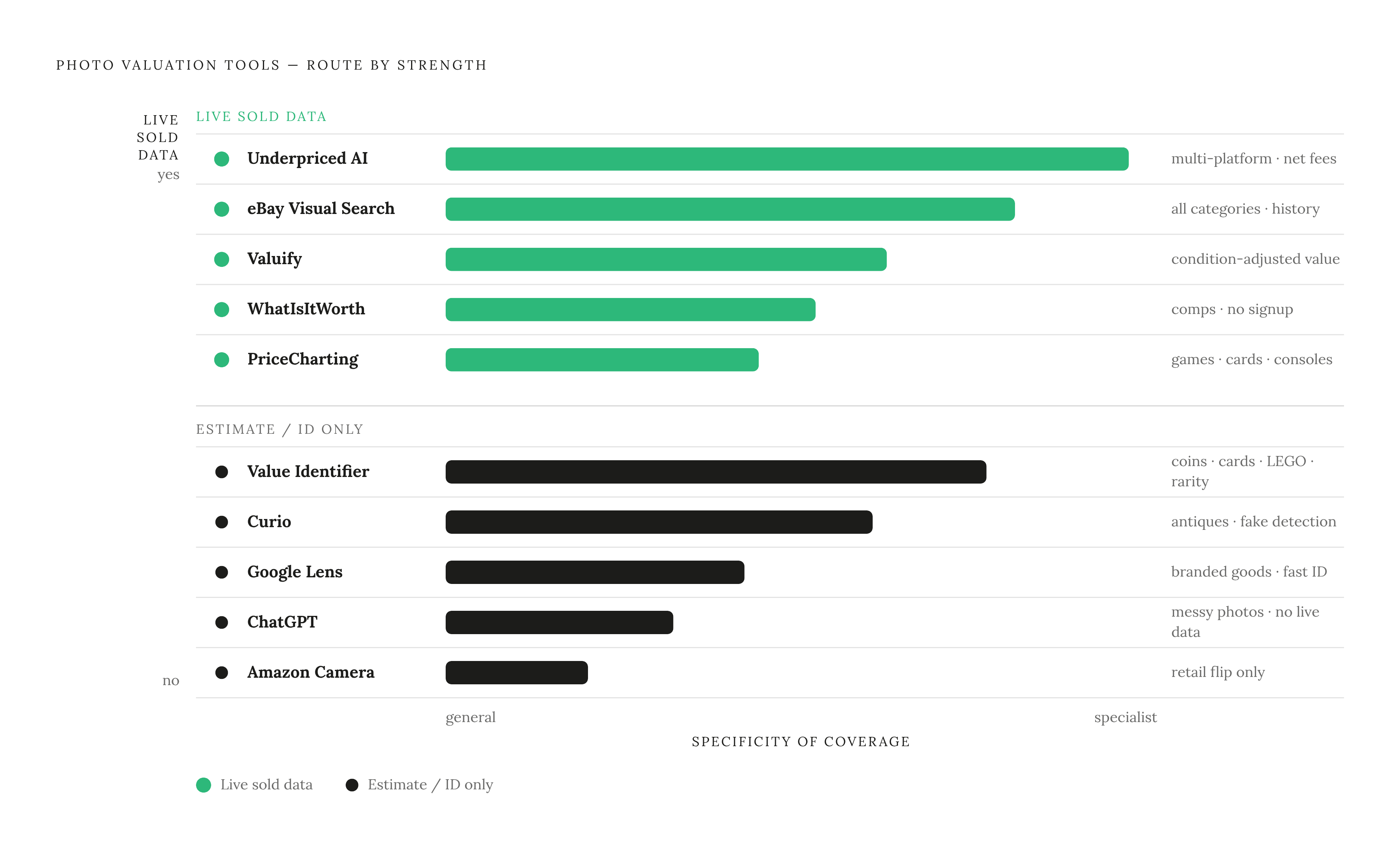
No single tool does everything well, so stop looking for the one that does.
Google Lens is fast, and it's good with branded stuff. Point it at sneakers or a kitchen gadget and it names the item almost instantly, plus gives you a rough sense of retail and resale context. Hand it an unmarked vintage lamp or a piece of studio pottery, though, and it shrugs.
eBay's visual search matches your photo against active listings on the platform, which makes it a natural next step after Lens. The real payoff shows up once you flip on the Sold Items filter and turn those active listings into actual transaction history. eBay's catalog runs deep enough that this works across almost any category you'd care about.
Amazon's camera search reads retail-branded goods faster and sharper than Lens does, but its pricing lives entirely inside Amazon's own world. That means it can miss or undercount value on vintage and collectible items that trade heavily elsewhere. It's built for one job, sourcing product to flip on Amazon, and it does that job and nothing else.
ChatGPT and similar chat tools are oddly good at naming items even from an angled, badly-lit photo. What they don't do is pull live sold data. Any price they hand you is a guess wearing a suit and tie, and you need to check it against real sold listings before you let it touch your wallet, some apps, like Reclaim, are built around pulling real eBay sold data from a single photo, which sidesteps that problem for everyday sellers.
Curio was built specifically for antiques and collectibles. It identifies maker, period, and rough value in one pass, and it flags reproductions and fakes, which matters whether you're buying or selling. Its user base is large enough that it seems to hold up across a wide range of antique categories.
Valuify pairs identification with live market value, and unlike a lot of simpler tools, it actually factors condition into the number it spits out. Solid pick if you're a casual reseller who wants one answer instead of a research project.
Value Identifier covers a lot of ground: coins, trading cards, watches, jewelry, sneakers, LEGO, vintage cameras, sports memorabilia. It grades rarity alongside condition too, which matters in collectible categories where a rare variant can be worth multiples of a common piece in identical shape.
WhatIsItWorth.com skips the account signup and pulls brand, model, and condition straight from your photo, then checks it against recent comparable sales. It hands you a range instead of one number, which is honestly more useful when you're negotiating and need to explain your reasoning to someone.
Antique Appraiser: Valued leans conservative. It grounds its numbers in auction and marketplace data instead of wishful asking prices, and it tracks your inventory with photos and valuations attached, handy if you're clearing an estate or documenting a collection for insurance.
Underpriced AI does identification, multi-platform sold-price lookups, and listing generation off one photo. It even shows net returns by platform after fees, so you can route an item wherever it actually earns the most instead of defaulting to whatever app happens to be open on your phone. Useful for anyone who wants pricing and listing help without piecing together multiple tools to get there.
PriceCharting isn't a photo tool at all; it's a catalog search, and you use it after you've already identified the item some other way. It shines in video games, graded cards, and consoles, where model names are standardized enough that a catalog lookup actually works.
A workflow I keep coming back to: identify with Lens or a category app, price with eBay's Sold filter or a multi-platform tool, then run gaming and card items through PriceCharting for the deep historical view.
Why sold data is the only pricing signal that reflects what buyers will actually pay
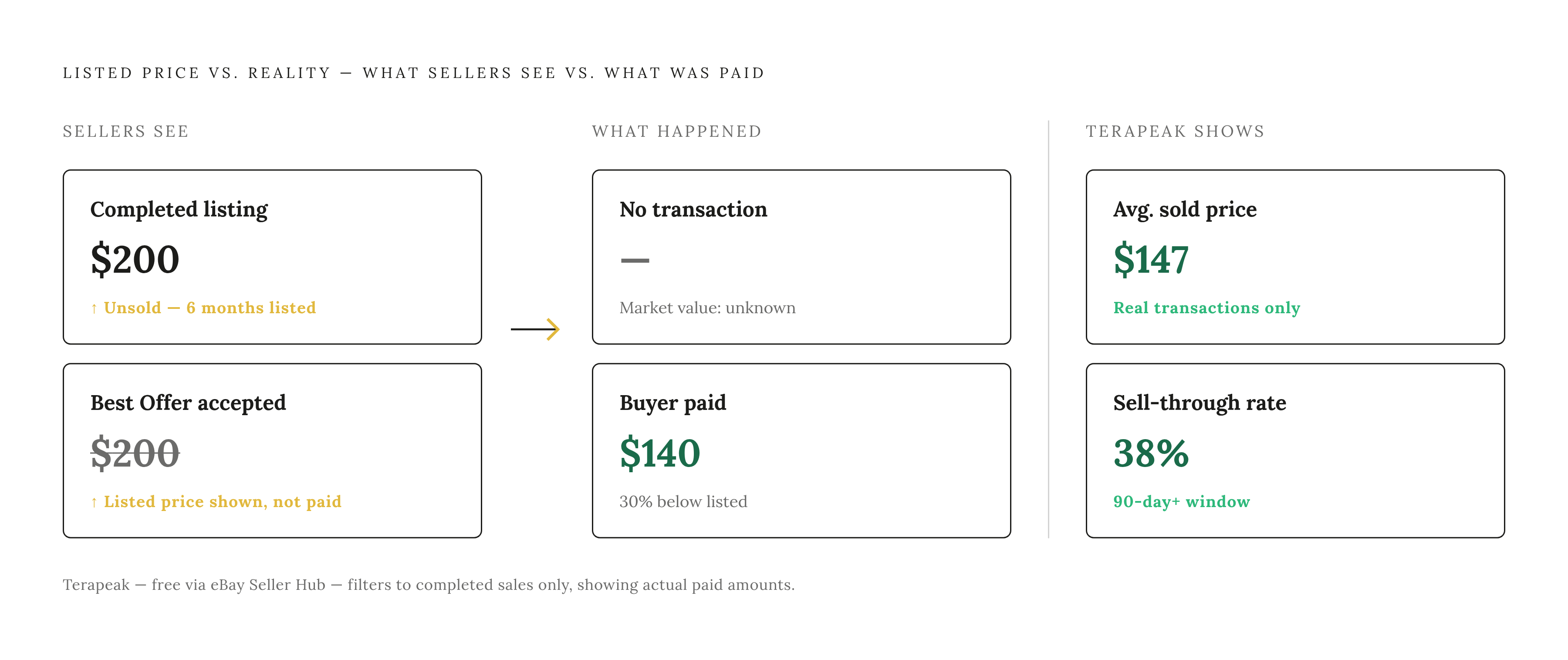
Active listings tell you what sellers hope to get. Sold listings tell you what buyers actually paid. Only one of those numbers is real.
An item can sit listed at $200 for six months and never sell. That tells you the seller is patient, or stubborn, or both; it tells you nothing about market value. A sold listing means money actually changed hands at that number, and that's the only definition of "worth" that should guide your pricing.
The gap between listed and sold can flip a sourcing decision from great find to why did I buy this. Two traps make it worse. eBay's "Completed Items" view lumps sold and unsold listings together in the same feed; unsold ones show up in a different color, but it's easy to skim right past that and mistake them for sales. Always filter to "Sold Items" specifically, never "Completed."
Then there's Best Offer. When a seller accepts a lower offer, eBay's default view still shows the original listed price with a strikethrough, not what actually got paid. Accepted offers usually land well below that listed number, so the strikethrough price you see overstates reality more often than not.
Terapeak, free through eBay's Seller Hub, fixes both problems at once. It shows the real transaction price, stretches your data window well past the default ninety days, and reports sell-through rate, the share of listings that actually sold. That number carries as much weight as price does. A high price with a low sell-through rate just means nobody's buying at that number.
One more wrinkle worth knowing: auction-format sales tend to close lower than Buy It Now sales, since an auction only captures what one small group of bidders felt like paying at one specific moment. If you're listing Buy It Now, treat auction comps as your floor and BIN comps as your ceiling.
A tool that blends active and sold data, or shows you only asking prices, hands you half a picture. Knowing which kind of data you're staring at matters as much as which tool you picked to look at it.
Translating a cluster of sold prices into a single listing price
A pile of sold prices isn't an answer. It's a range, and your job is figuring out where your specific item sits inside it.
Start with your search terms, because vague keywords wreck everything downstream. Search "vase" and you get garbage. Search "McCoy pottery Hobnail vase 8 inch" and you get a usable comp set. Before you even type anything in, write down the maker's mark, any label or stamp, measurements, rough age, condition issues like chips or repairs. That homework pays for itself fast.
Once you've got a decent comp set, sort it low to high and look for where most of the sales cluster, roughly the 80th percentile mark. That's your realistic ceiling for a well-conditioned item, not the one outlier sale that tripled everything else because two bidders got into a grudge match over it. Price near the low end if you want a fast sale. Price near the ceiling if your item's in great shape and you can afford to sit and wait.
Timing matters too, more than people give it credit for. Prices move with seasons, cultural moments, product cycles. An older electronics model that looks fairly priced today can lose real value overnight the moment a newer version gets announced. Check how recent your comps actually are, not just their average.
Doing all this by hand for one item eats real time: precise keyword searches, filtering to sold, clicking into individual listings to double-check condition and variant, adjusting for auction versus Buy It Now. It piles up fast across a whole box of thrift finds. Tools that automate this step save that time in bulk, and eBay also offers built-in price guidance for some categories (sports cards among them) pulled from recent sold data. Decent sanity check. Shouldn't replace your own comp review once real money's on the line.
How condition assessment connects the photo to the right price tier
You've identified the item. You've found solid comps. One variable's still hanging out there, and it's the one most tools botch: where does your specific copy land inside that range?
Condition is that variable, and it's genuinely hard for a photo tool to nail. The tool is matching visual appearance, not testing whether something works, not counting whether all the pieces made it into the box. A photo can't tell you if a watch keeps time.
The usual condition tiers (Mint, Very Good, Good, Fair) map to real price bands. List a scratched-up item as Mint and price it at the top of the range, and you'll either sit unsold for months or eat a return plus an angry message.
Before you settle on a condition label, check four things: does it work as intended, what does the cosmetic wear look like (scratches, fading, yellowing), is the structure sound (cracks, missing pieces, past repairs), and is it complete with original accessories and packaging.
Tools like Valuify, which ask you to input condition directly, give you a more useful number than tools that just identify the object and stop there. That number is only as good as what you feed it, though. Garbage condition data in, garbage price out.
Honesty pays off here too. Buyers who see accurate photos and accurate condition descriptions self-select into the right expectations, which cuts down on returns and bad feedback down the line. And for categories with formal grading, trading cards, coins, comics, condition assessment turns into its own specialty. Tools that flag rarity alongside condition, like Value Identifier, at least remind you that a professional grade can swing value further than any quick photo scan would suggest.
Which categories respond best to photo-based valuation and which require more caution
Photo tools do best where items look distinct, carry standardized model names or maker's marks, and sell often enough that sold-price data stays deep and current.
Gaming hardware and cartridges sit near the top of that list. The catalogs are well documented, transaction volume runs high, and condition expectations stay fairly standardized across the hobby, so PriceCharting paired with eBay Sold data gives you numbers worth trusting. Trading cards and collectible card games work almost as well; condition and edition swing value hard, but visual ID tools paired with catalog lookups handle most cases, and rarity tools add real value on top of that.
Branded clothing and accessories, the big names like Coach, Nike, Lululemon, Kate Spade, have comp pools deep enough that brand-filtered sold data gives you a tight, reliable range. Small consumer electronics land in the same bucket: cameras, calculators, remotes, routers. Model numbers are usually printed right on the item, and sold data runs dense. LEGO rounds out the strong category, since set numbers identify cleanly, though completeness swings value hard enough that condition checking matters just as much as identification does.
Caution climbs sharply with antiques and vintage pieces carrying no visible maker's mark. Identification gets harder, comp pools thin out fast, and a single detail, a date stamp, a regional pottery mark, can swing value by a wide margin. This is exactly where a specialist tool built for the category, or an actual human appraiser, earns their keep over a general photo scan.