How eBay Seller Fees Actually Work for Beginners
eBay takes a cut of shipping too, which means a $150 sale nets you $120.97.
Two fees hit every seller, full stop. There's an insertion fee when you list and a final value fee when it sells, and the second one is where people get surprised, so let's start there.
Casual sellers barely notice insertion fees since eBay gives you 250 free listings a month. Blow past that and you're paying $0.35 a pop, which won't ruin anyone's month unless you're the kind of person who lists 300 pairs of sneakers on a Tuesday night because you couldn't sleep.
The final value fee is the one that actually bites, and it's not calculated on your item price alone. It's item price plus shipping plus handling, all added together first. Sales tax gets collected by eBay on your behalf, but it still counts toward the base eBay uses for the fee, which feels like getting taxed on a tax. Standard rate in most categories: 13.25% to 15%, plus a flat $0.30 per order under $10, or $0.40 above it.
Here's the part nobody tells you at the start: charging for shipping doesn't make that money yours free and clear. eBay takes its cut of the shipping charge too. So "free shipping" versus charging for shipping isn't a wash, it changes what actually lands in your account, and most people don't find that out until they're staring at a payout wondering where the rest of it went.
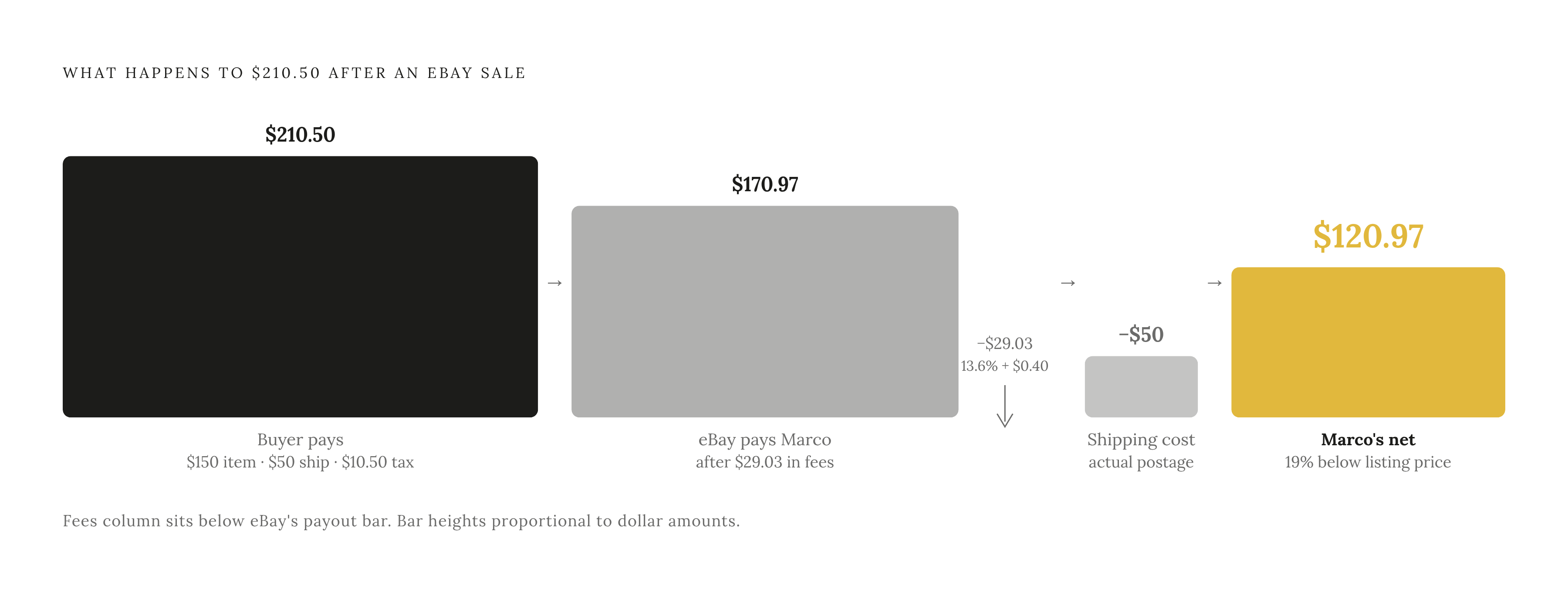
eBay's own Seller Center has a walkthrough with a guy named Marco selling golf clubs, and it's a good gut check. He lists them at $150, and the buyer pays $210.50 total ($50 shipping, $10.50 tax). The final value fee comes out to 13.6% of that $210.50, plus the $0.40 flat fee, so $29.03 total. eBay pays Marco $170.97, he spends the actual $50 on shipping, and he nets $120.97.
A $150 listing turns into $120.97 in his pocket. That's not a rounding error, that's almost 20% gone before he's even accounted for what the clubs cost him to acquire. Run this math before you list. The golf clubs don't care, but your margin does.
Why your category determines your fee rate
Final value fees swing from 2.5% to 15.3% depending on category, so a vintage lunchbox and a set of motorcycle parts are playing two completely different fee games.
Most general merchandise sits at 13.25%, plus the usual $0.30 or $0.40 flat fee. Some categories land lower, 12.9% to 15%, and the rate you land on depends entirely on what you're selling. A watch, a video game, and a jacket aren't the same fee conversation, even if they're the same size box.
Look up the actual table for your category. Don't assume the standard rate just because it's standard for everything else, because "everything else" isn't what you're selling.
One more thing worth flagging: rates went up 0.35 percentage points across most categories on February 14, 2025, of all days to raise seller fees. If you're reading a guide written before that, the numbers are stale. Trading cards and bullion sales over $7,500 got carved out of that increase, so collectible sellers in those lanes are still working off the old math, which for once works in their favor.
The fees most beginners don't know exist until they appear on an invoice
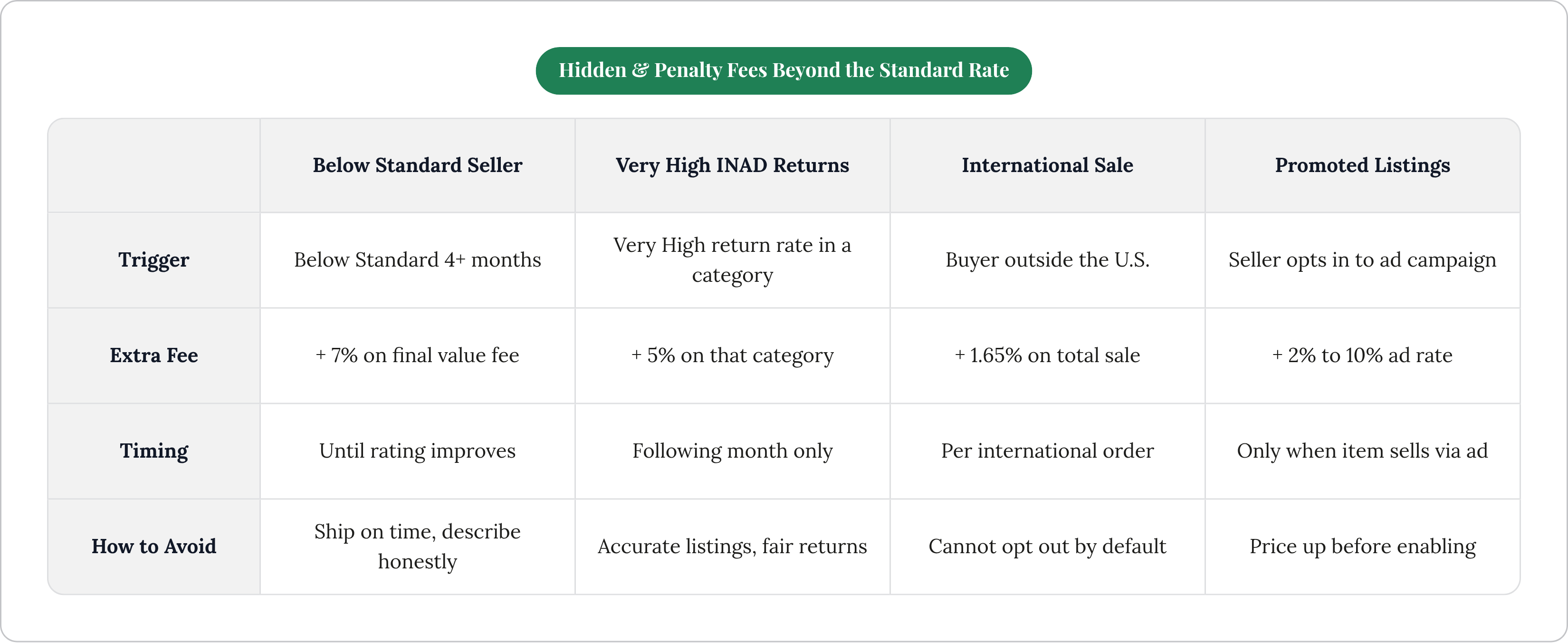
Three charges live outside the standard final value fee, and none of them announce themselves ahead of time.
Penalty fees come in two flavors, and both are eBay pricing in bad behavior. Get rated Below Standard for four straight months, and you're paying an extra 7% on final value fees until you climb back out. Rack up a Very High rate of "item not as described" returns, and it's an extra 5% on that category the following month. Ship on time, describe things honestly, answer your messages, and you'll never meet either fee, which is simple enough in theory.
International fees are the quiet one. Sell to a buyer outside the U.S., and there's an extra 1.65% on the total sale, stacked on your normal final value fee. Easy to forget, since your listing is visible to the whole planet by default and there's no toggle to turn that off.
Promoted Listings is optional, though plenty of sellers flip it on anyway because visibility moves items. You pay only when it sells through the ad, usually 2% to 10% depending on the rate you set, and it stacks on top of the final value fee rather than replacing any part of it. Run a 5% ad rate on a category already at 13.25%, and your real take rate is past 18%, before shipping costs even enter the picture. Sellers who turn this on without adjusting their price up are often selling at a loss for months before they do the math and realize it.
How to price an item so the fees don't eat your profit
The single most common mistake is pricing off active listings rather than sold ones. Active listings show you what people hope to get, while sold listings show you what buyers actually paid. Confusing the two is how people price themselves into a loss before the box is even taped shut.
Finding sold comps isn't hard once you know where to click. On desktop, search the item, open filters, toggle "Sold Items." On mobile, tap Filter, scroll to Sold Items, flip it on, apply. eBay defaults to showing the last 90 days. For a longer view, eBay Product Research (renamed at some point, lives in Seller Hub now) pulls up to three years of history, and it shows what buyers actually paid on Best Offer sales, not the number the seller was hoping for.
That Best Offer detail trips people up constantly. A green price with a strikethrough through it is the listed price. The negotiated price, the one that actually changed hands, can run well below that, and the standard sold view won't tell you the difference.
Don't skip past the red, unsold listings either. A dozen sellers pricing the same item at the same high price with zero sales isn't bad luck, that's a ceiling.
Once you've got comps, the formula is:
Price = (Cost + Fees + Shipping + Buffer) ÷ (1 – Target Profit %)
Fees means your category's final value fee, the per-order fee, any Promoted Listings rate, and the international fee if you're shipping overseas. Shipping shows up twice, once baked into the comps you pulled, and again as the real cost you'll pay out of pocket to move the box.
Where you land in that comp range depends on how patient you're feeling. Top of the range is slow, 30 to 60-plus days, fine for collectibles that aren't going anywhere. Middle is the default for most general merchandise, 7 to 21 days. Bottom moves fast, 1 to 5 days, and makes sense when you need the cash more than you need the extra ten bucks.
Zero views after 72 hours means the market already voted, and it voted no. Pull what actually sold in the last three days and adjust down. Watch your dates too: a comp for a winter coat pulled in December tells you nothing about pricing that coat in July.
When an eBay Store subscription changes the math — and when it doesn't
Store subscriptions aren't for everyone, and eBay doesn't pretend they are. Plans run $4.95 a month at Starter up to $299.95 at Anchor, each tier buying a bigger free listing allowance and lower final value fees in certain categories.
Rough breakeven: past 300 items a month, a Basic Store usually pays for itself just through the insertion fees you'd otherwise be handing over. Under that, you're paying a subscription to save money you weren't spending in the first place.
There's a separate lever too. Top Rated Seller status isn't a paid tier, it's a performance badge, and it can knock up to 10% off your final value fees on qualifying sales. Fast shipping, honest listings, answering buyer messages, all of it compounds into actual dollars, not just a gold star next to your username.
Clearing out a closet or selling a few things from around the house? Skip the Store, since the free 250 listings a month has you covered. Ask yourself honestly whether you're listing often enough that the subscription fee pays itself back in savings. If yes, run the numbers and upgrade. If no, stay on the free tier and don't feel bad about it.
Tools that do the fee math for you before you list
Nobody should be doing this arithmetic by hand every single time, and that's what calculators exist for.
eBay's own Selling Fees Calculator is the obvious first stop. Item price, category, shipping charge, listing upgrades, in it goes, and out comes an estimate covering final value fees, insertion fees, and the flat per-order charge.
Salecalc goes further, letting you pull together more of the variables at once, useful once Promoted Listings enters the picture and you want the full number in one place instead of three separate mental sums. FeeCalc gives you a visual breakdown of the fee components, handy if you want that 1.65% international fee accounted for up front instead of discovered after the fact.
Some tools take a more integrated approach, combining item research and fee math into a single workflow rather than separate steps you have to remember. Shipping and payouts still run through eBay's standard process regardless of which tool you use to prep the listing.
Whichever tool you pick, the point is the same: run the fee math before the price goes live, not after the payout lands and comes up short of the number you had in your head.