One Photo Is All It Takes to Go From Clutter to Live Listing
Three photo-to-listing apps compared, plus how to price from sold data.

A snap-a-photo AI listing app can turn a picture of your clutter into a title, description, condition assessment, and suggested price without making you write from scratch. DeClutter handles single-image listing creation, ClearList handles batches and pickup scheduling, and ZaZooomIt serves garage and moving sales. Removing the work between “sell this” and a live listing gives the pile a way out.
Why most clutter never gets sold
There is the bouncer the kid outgrew, the mixer that has lived in the garage since the move, and the bag of clothes waiting for a free afternoon. The intention to sell is already there. What is missing is time to identify, research, describe, price, and post each item before a buyer can even see it. A roughly 15-minute task sounds manageable until every object in the pile requests its own appointment.
ClearList captures that hesitation plainly. “Writing and pricing everything sounds like a whole weekend”. When the next step feels that large, walking past the pile is understandable. “Sell later” becomes permanent storage with a more optimistic name, because sorting an item out of daily use does nothing to reduce the work of listing it.
What the listing process actually costs per item, done manually
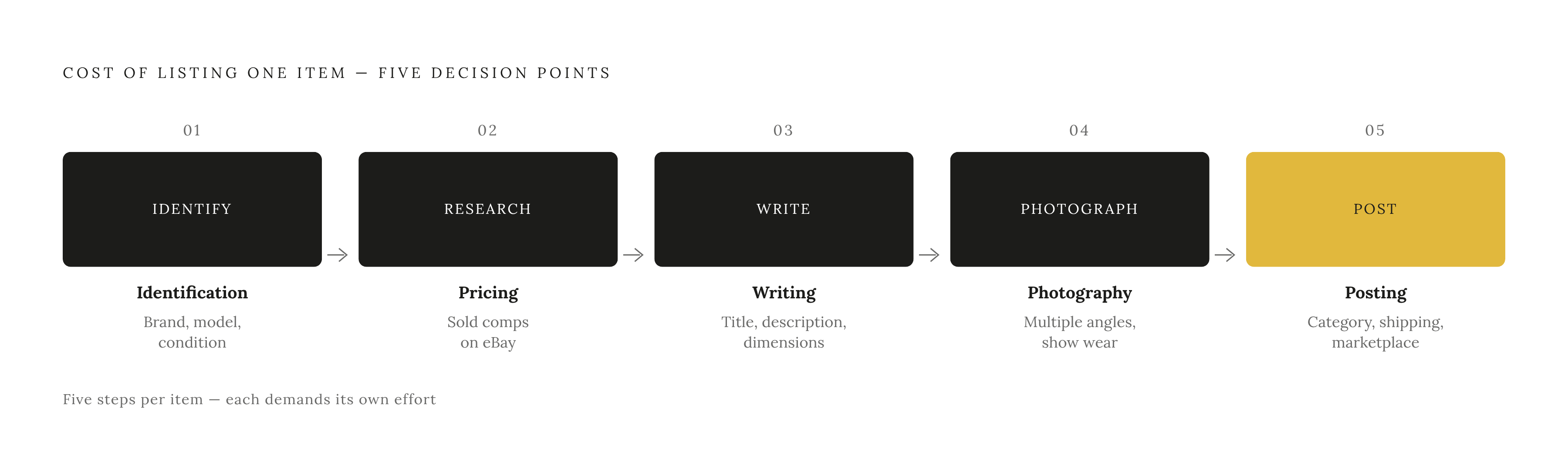
Identification comes first, because buyers need the right brand, model, and condition to find an item in search. Then comes pricing research. That means finding what comparable items actually sold for. On eBay, the useful evidence sits behind the Sold/Completed filters. Facebook Marketplace publishes no sold-price history, so a seller working there needs an outside benchmark.
Writing is the third job, covering the title, description, condition notes, dimensions, model numbers, and included accessories. Taking photos is the fourth job, with shots from more than one angle that show the wear as it is. Posting is the last step, when the seller adds the category, item specifics, and shipping policy and chooses the marketplace. Each step asks for another small decision. With even ten items, that sequence turns a modest clear-out into an admin project, and the unpaid project manager already has a job.
Is there an app where one photo creates the listing in seconds?
Yes, photo-to-listing apps use image recognition to identify an item and turn those details into listing text and a price suggestion. Tools that use sold comparisons can also replace the research step, while publishing features reduce the work of posting. The exact handoff differs between apps. A generated listing is not always a published listing, and a suggested price is not automatically a price drawn from completed sales.
DeClutter produces a studio-quality photo, title, description, condition grade, and price from one image. It works on web, iOS, and Android to help sellers make a listing from one image. The app claims it can process many items in minutes on desktop. Its free trial includes five scans with no credit card required, followed by Starter and Pro paid tiers.
ClearList takes a batch of photos, groups them into items, and writes listings with suggested prices and the reasoning behind them. It also manages buyer queuing and pickup scheduling, addressing the messages that follow listing creation. That makes it useful when coordination is the headache. It is free to try with one photo, without an account or credit card.
ZaZooomIt is designed for garage, estate, moving, and downsizing sales. A photo of a table, shelf, or garage bay lets its AI detect, name, and price individual items. It generates a shareable sale page with a map pin, dates, and a QR code, then uses a Chrome extension to fill listings into destinations including Facebook Marketplace, OfferUp, and eBay. The seller presses Post from their own account. Its smaller garage-sale plan costs $19.99 per sale, with a higher tier for larger batches, no commission, and no subscription.
The apps differ by workflow: DeClutter focuses on preparing an individual listing, ClearList adds batch handling and pickup coordination, and ZaZooomIt organizes a sale containing many items. Sellers can still check and edit the listing before it goes live. One photo can start the process, but it does not excuse an inaccurate condition note or make hidden damage visible.
Pricing from sold data, not asking prices — why the distinction matters and how to do it
An asking price records what a seller hopes to receive. A sold price records what a buyer actually paid. Copying asking prices can leave an item overpriced and idle, or underpriced with money left behind. Wishes are not market research, even when several sellers share them.
For a manual check, search eBay for the same item and filter to Sold or Completed listings, focusing on completed sales. Read the cluster of recent prices, excluding the highest and lowest outliers. Match the model and condition as closely as possible. eBay’s Product Research tool, formerly Terapeak, extends the view to up to three years of sales history. It is free in Seller Hub for desktop sellers who have made at least one sale, with mobile access tied to an active listing or a sale within a recent window.
For Facebook Marketplace, which has no sold-price history of its own, eBay’s sold data gives sellers prices to check against. Condition then helps interpret that evidence. As rough guidance, like-new items with boxes or tags may fetch half to 70 percent of retail, while good, lightly used items may fetch a third to half. Fair but functional items warrant a small fraction of retail. Rough items or parts should be priced well below those ranges to move quickly, rather than assigned a flattering label and a hopeful number.
Before settling on a price, account for platform fees, payment processing, shipping, packaging, and room for negotiation. Net proceeds are the useful number here. Facebook Marketplace’s “Make an offer” feature makes bargaining part of the process, so a price slightly above the real minimum leaves space for it. These calculations also provide a useful check on AI suggestions. Apps that pull live sold comparisons remove the research burden, but the seller still needs a price that works after costs.
Matching each item to the marketplace where it will sell fastest
Electronics, collectibles, and branded goods are a good fit for eBay, where buyers from across the country help these goods sell for higher gross prices. Furniture, large appliances, and bulky home items fit Facebook Marketplace because local pickup avoids shipping. Its local pickup model has zero fees, while shipped orders incur a fee. A wardrobe does not bring in more money by becoming a puzzle to pack.
Clothing needs a more specific match than “fashion app”. Depop is a good fit for vintage and Y2K clothing, where following and sharing help items sell. Poshmark is a good fit for fashion, streetwear, and social selling, with a flat fee for smaller sales and a percentage of the price once it passes a set amount. Vinted charges no selling fees, while the buyer pays a Vinted fee. That distinction can preserve more of a lower-priced clothing sale for the seller.
The largest selling price is not necessarily the largest payout. eBay’s higher gross prices come with fees, while local pickup can avoid shipping expenses on bulky goods. Cross-listing to eBay and Facebook Marketplace reaches both national shipping buyers and local pickup buyers. Photo-to-listing tools that support both reduce the duplicate entry that once made this feel like professional-reseller territory.
What actually sells, by room and category
Start in the kitchen with the appliances and cookware bought for their quality. Stand mixers, espresso machines, and high-end cookware from KitchenAid, Le Creuset, and All-Clad can retain meaningful resale value. These are more likely to be worth selling than a random drawer of utensils. Whether buyers still seek a particular item matters more than whether it once cost money.
In the living room, smart TVs under three years old, sound systems, and streaming devices are worth attention. Older televisions often do not justify the listing effort. Functional electronics remain sellable, but depreciation makes delay expensive. Solid wood furniture, mid-century modern pieces, and vintage art are also worth checking for resale value. Particle board and IKEA furniture have very low resale value and are usually better donated.
Next, look through wardrobes for designer clothing and quality leather goods, then through the garage for power tools. Collections call for more specialized pricing help. BookScouter compares dozens of book vendors, while PriceCharting offers free pricing tools and an app for video games and trading cards. WorthPoint serves antiques, and Discogs provides free real sales data for vinyl records. These tools help where the category itself determines value.
For uncertain items, ZaZooomIt’s AI value check offers a suggested price, selling tips, and a recommendation to list, bundle, donate, or keep. That decision comes before polishing a listing. An item can still work perfectly well but be worth too little to sell on its own. Knowing which is which keeps the clear-out from turning into a job cataloguing a museum for no pay.
A room-by-room declutter approach that ends in sold items, not a bigger pile
To turn those candidates into sales, pick one room and allow a one-to-three-hour block for sorting and listing. Use four boxes with the labels Keep, Sell, Donate, and Discard. Decide when touching each item rather than creating a fifth category called “think about it”. That fifth box is usually the old pile in disguise. The session includes listing the sell box before moving to another room.
Photo-to-listing tools fit at that exact handoff. Once sorting is finished, photograph the items to sell and use the generated drafts for review. Tools that work in batches can make several listings without the seller having to write each one. The key is keeping sorting and selling together. Otherwise, even a neatly sorted sell box is still storage, just with better labels.
For someone overwhelmed by a whole room, the 5-5-5 rule offers a smaller start through a few minutes, a handful of items, and repeated short sessions. A move gives the same process a firmer deadline because the sell pile is also something that might need packing. In that setting, a moving-sale tool can group items into one sale page rather than treating every object as a separate project. The practical goal is a live listing before the next task takes over.
Scams to know and listing details that convert browsers into buyers
Once a buyer responds, verify payment in your own account. Do not ship while payment is pending, because pending payments can be cancelled after an item is in transit. A screenshot is not a bank balance. Pressure to move the conversation to WhatsApp, email, or text is another red flag, because the marketplace cannot keep watch over what happens off-platform. Question any overpayment immediately, and never refund it through a different payment method.
For sales on Facebook, use approved ways to pay, such as Facebook Checkout through Meta Pay or credit/debit card, or PayPal with Goods and Services turned on. Avoid Zelle, Venmo, wire transfers, and gift cards, which offer little or no buyer protection. For local pickups, use police station safe exchange zones. Many departments provide designated parking-lot areas under 24-hour video surveillance. A convenient sale still needs a safe handover.
With safety covered, give the listing a short quality check. Photos should show multiple angles and visible wear, even if one image generated the draft. Give the dimensions and model numbers. Spell out which accessories are included. Make clear whether the price is firm, negotiable, or open to best offers, and whether pickup, shipping, or both are available. Note the preferred payment method so buyers know the terms before messaging.
AI handles much of the writing and pricing work, but the seller can inspect what the camera missed. Check that the condition notes match the item before the listing goes live. A scratched surface should not become “like new” because the draft sounds convincing. The final task is checking that the buyer will receive what the listing promises.