Apps That Turn a Full-Room Photo Session Into Ready-to-Post Listings
Photo-based listing apps cut hours of room clearing to minutes.

ClearList and Listed AI let sellers photograph items across a room and generate listings in batches. The tools compress hours of research and writing into a single review session. These tools work from photos of individual items.
Why listing a whole room used to take days — and why that stopped most people from starting
Walking past the pile is easy until it starts to look like office work with no pay. Each item needs photographs, identification, price research, a title, a description, and a category before it can go live. That manual work can take roughly 10–20 minutes per item for a careful seller. Across a guest room, moving sale, or estate cleanout, that becomes hours of repetition before there is much to show for it.
The pile stays because it takes too much work to get started. Software cannot supply the urge to declutter, but it can remove much of the work between taking a photograph and publishing a listing.
How the photo-to-listing pipeline actually works, from image to ready post
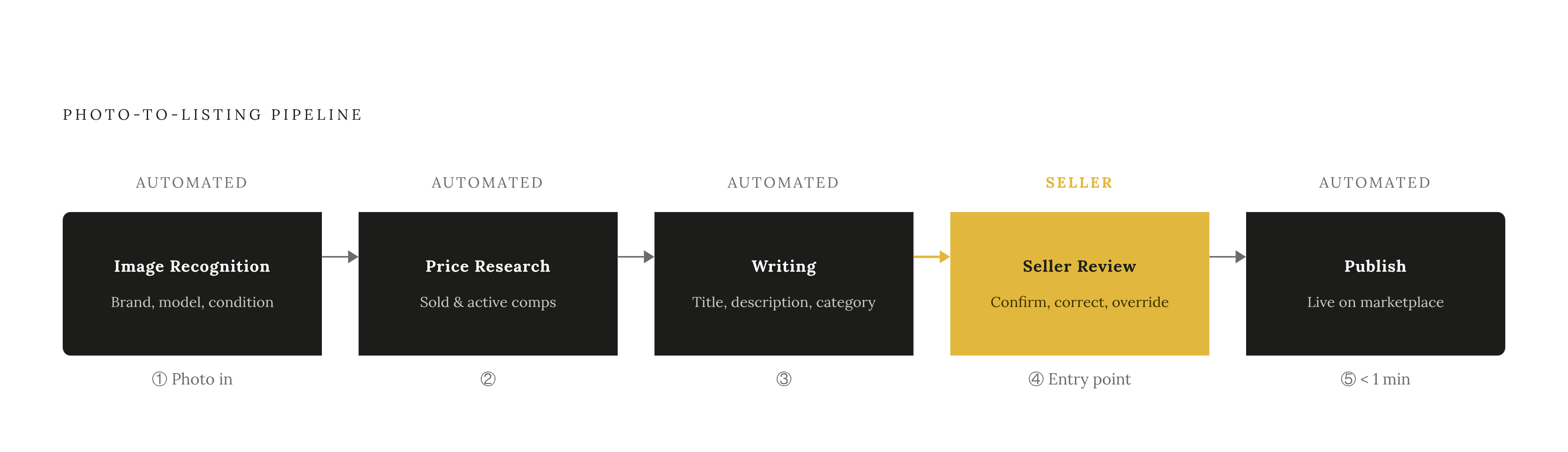
The process starts with image recognition, which identifies the item’s brand, model, apparent condition, and relevant details from the photograph. There is no form to fill out first. The app then looks for comparable prices and suggests a figure, drawing on sold listings, active listings, or both. Finally, its writing system turns that information into a title, description, and category suited to the destination marketplace.
This sequence can take under a minute for most items. The seller enters at the review stage, confirming the identification, correcting details, or overriding the price before publishing. That changes the job. Instead of being researcher, copywriter, and data-entry clerk, the seller becomes the editor of a finished draft.
The draft is only as reliable as its inputs. A visible label gives the system a firm basis for identification, while an honest condition photo helps it describe the actual item. Goods with brands that the system can recognize work well in this process. A photograph can remove typing, but it cannot make an invisible model number legible.
What app lets you list everything in a room in one session?
Listed AI makes the batch workflow explicit. Sellers add photos for each item, group them, generate the batch, and then review and copy the finished listings. Three items get three listings in one pass. The important change is the order of work, because photographing everything no longer means stopping after every object to research and write.
ClearList takes a different route to the same room-clearance goal. It accepts a batch of photos, groups them into items, writes listings with suggested prices, and puts the results on a shareable link. The seller reviews anything that looks wrong, then shares one URL. That works better for a room full of goods than making a new post for every lamp.
In practical terms, a seller could spend 20 minutes photographing a room and review the drafts over coffee. Reviewing every listing is still necessary, but checking a draft takes seconds where composing one takes minutes.
What separates the tools — sold-price data versus active-listing comps
The sharpest distinction is what the price represents. Sold-price data shows what buyers paid, while active-listing comparisons show what sellers hope to get. Asking prices routinely run above eventual sale prices, so treating them as equivalent can leave a room-clearance seller with polished listings and precisely the same room. An optimistic price is not evidence of demand.
Valuable surfaces sold-price comparisons, distinguishes confirmed sales from active listings, and explains its reasoning in conversation. That lets the seller assess whether the comparison supports the suggested price. The evidence is part of the product.
Relist AI describes its pricing as based on “real second-hand marketplace data,” which does not itself establish the same distinction between asking and sold prices. Comparisons with active listings can also lead to prices that are too low when sellers in the area are asking less. The basis of the suggestion deserves as much scrutiny as its precision. Sellers can check eBay’s completed listings themselves and look for SOLD results.
A category-by-category look at what the AI actually recognizes well
For electronics, image recognition can draw on brands, model markings, and differences between generations that show up in a photo. The limits are equally practical, because a recognizable laptop shape is less useful than the model information that identifies the particular machine. Better identification gives pricing research a firmer starting point.
List My Closet specializes in apparel resale, while Poshmark’s Smart List AI approach shows why a tag close-up is useful for identifying brand, size, and material together. Collectibles need more judgment. Relist AI says it supports Pokémon cards, but the seller’s corrections matter especially because the cards need condition grading.
Furniture and home goods also fit the workflow, and Relist AI explicitly supports furniture. Facebook Marketplace is a good fit when buyers need to pick things up locally, so being able to post straight there helps. Standard furniture, branded clothing, electronics, and name-brand toys make up much of what people sell when clearing an ordinary room. The awkward cases are unbranded goods, unmarked antiques, handmade pieces, and mixed-condition lots. Those may need the seller to identify them first, while Valuable’s correction loop updates the identification, price range, and comparisons when the seller explains that the initial guess was wrong.
How the tools map to different seller situations
For a garage or moving sale, ClearList is the closest match to a shared sale page with local-pickup organization. Its batch-photo workflow leads to one link, with reservations and pickup bookings built in.
Meta Seller App lets people who sell locally now and then post straight to Facebook Marketplace for free. It launched July 24, 2026, for US iOS users 18+ and supports up to 10 photos per listing. Sellers who are happy to bargain with local buyers may accept its limits on pricing. Listed AI fits sellers who need to make a batch of listings, then check and copy each one.
Valuable fits estate professionals, liquidators, and dealers who need sold-price evidence, offline work, and team collaboration. It publishes to estate sale sites, with Shopify coming soon, and is priced for professional use. SECND addresses high-volume teams working across Poshmark, Depop, Etsy, Shopify, Grailed, Facebook, and TikTok Shop. At $99–$299/month, it generates marketplace-specific language variations for that broader operation.
For an apparel-heavy clearout, List My Closet is the focused option for clothing resale and crosslisting. Relist AI suits sellers who want output to paste anywhere, with iOS and Android apps, a free tier, photo enhancement, and multi-language support. ResellPro fits Android sellers using Vinted DE, classifieds, and eBay DE. Updated April 2026, it accepts up to 4 photos and offers optional background removal with copy-paste output.
These are not all solving the same problem. AI listing apps create the first listing from a photo, while crosslisting managers distribute an existing listing across platforms. The two can complement each other, but distribution alone does not remove the blank-page work that makes a room clearance stall.
What AI-generated listings do and don't handle on the buyer communication side
A listing with all the details gives real buyers enough to decide without having to ask basic questions first. Accurate condition notes, a specific title, and a defensible price reduce uncertainty. They do not eliminate the inbox. “Is this still available?” has not been defeated by the invention of the description field.
The tools differ in what happens after publication. Meta Seller App separates buyer messages by listing in a seller inbox, away from personal conversations, group chats, and spam in the main Messenger inbox. ClearList goes further into buyer coordination, allowing up to three buyers per item to hold a reservation. When a seller marks a no-show, the next buyer moves up automatically and receives an email.
ClearList also lets sellers set pickup hours for buyers to book, which cuts down on messages to agree on a time. Its address-sharing rule limits the address to verified buyers. For tools without those features, a better listing still helps buyers arrive informed, but it does not manage the queue. Honest condition photos also create a clearer record of what was offered, reducing room for later claims that the item was misrepresented.
Scam patterns that target room-clearance sellers and how good listings reduce exposure
Check that the payment is in the actual bank account or payment app before handing over or shipping anything. Never share verification codes with buyers. Where platform checkout is available, keep the transaction there rather than treating an email or screenshot as proof of payment.
The familiar scams exploit departures from those rules. An overpayment or fake-check buyer sends more than the asking price, then pressures the seller to refund the difference before shipping. A fake payment screenshot substitutes an image for actual funds. A verification-code request can link a Google Voice number to the seller’s real number for further fraud.
Payment choice needs the same discipline. Zelle, Cash App personal transfers, Venmo Friends and Family, wire transfers, cryptocurrency, and gift cards offer no recourse if the transaction goes wrong. Facebook Marketplace purchase protection applies only to eligible transactions through Facebook’s checkout.
For high-value electronics, record serial numbers and remove personal data. Complete backups and account removal, then confirm that the device is fully wiped before the sale. The listing’s role is narrower but still useful, documenting the item and its disclosed condition through specific descriptions and honest photos. That record can reduce dispute risk, but it is not a substitute for confirming payment.
Getting the most out of a photo session before you open any app
To keep review work light, photograph each item individually in natural light against a plain background, with the item filling the frame. A wall, sheet, or well-lit floor is enough. Include a brand label, model number, or size tag in at least one shot so that identification, pricing, and categorization have an anchor.
For clothing, a tag close-up can supply brand, size, and material together. For electronics, photograph the model plate or back panel. Show flaws clearly too. Relist AI says its photo enhancement improves lighting without hiding real flaws, so the item is easier to see while still looking like what it is.
Keep each item’s photos together as you shoot to save the work of grouping them later. That does not mean sorting the entire pile first, which ClearList explicitly says is unnecessary. If the pile still feels overwhelming, start with one item. One good listing is enough to prove the process before taking on the rest.