Declutter Apps Features That Speed Up Facebook Marketplace Listings
Four tools fix Marketplace's biggest time-wasters, from photos to relisting.

Most Facebook Marketplace listings die before they ever go live, and the reason has nothing to do with motivation. The real culprit is friction: four separate tasks stacked in sequence, each one tedious enough on its own to make a seller close the tab. Pricing research, photo cleanup, writing a description, and keeping the listing fresh all have to happen before a single item sells, and doing any one of them by hand can burn enough time to make the whole project feel like a chore nobody asked for. Attacking each of those four friction points with a tool built for that specific job is the fastest way to list items on Facebook Marketplace without losing an afternoon to it.
Meta seems to agree. In July 2026, the company launched a dedicated Seller app, built to pull pricing, photos, descriptions, and relisting into one place. A platform doesn't build a whole new app unless it has noticed its sellers tapping out partway through. The rest of this guide walks through each friction point in order and names the tools that solve it, so that posting multiple items for sale on Facebook stops taking forever and starts taking minutes.
Photo cleanup: removing backgrounds before uploading
A photo shot on a cluttered countertop isn't a style choice, it's a tax on attention. Buyers scroll Facebook Marketplace the way they scroll everything else: fast, half-distracted, ready to move on. A pair of sneakers photographed next to a laundry basket has to compete with the laundry basket for the eye, and in a feed full of better photos, the basket usually wins by default.
Background removal tools exist to take that fight off the table. BOARD and PhotoRoom both work the same basic way: upload a photo, get back a version with a clean background, no desktop software and no editing skill required. BOARD gives you five free edits per browser with no account needed, and after that, credit packs run 50 cents per edit with no subscription attached. That low bar removes "I'll take better photos later" as an excuse for leaving a listing in draft. The real value is one less excuse standing between a seller and hitting "post," which is the actual thing keeping half of these listings in draft purgatory.
AI-written descriptions: what gets generated from a single photo
Staring at a blank description box kills more listings than bad photos do. Most casual sellers aren't writers, and asked to produce a title, a condition note, and a few sentences of body copy, plenty just close the app instead. AI description tools exist precisely to remove that blank box: upload a photo, and the tool writes the listing for you.
A description that actually converts needs a few specific ingredients: a title with the brand and product type in it (think "Madewell Perfect Vintage Jeans, Size 28, High Rise" instead of "Women's jeans size 8"), a one-line condition note, a short description buyers can skim in two seconds rather than a paragraph they'll scroll past, and a category tag. Meta's Seller app, open to U.S. users 18 and older on the App Store, handles this with a built-in AI tool: upload a photo, and it generates a title, a description, a category suggestion, and a price suggestion, all dropped into a listing that's ready to post. Third-party tools follow the same basic move. Reclaim: Sell with AI generates the same title-description-category package from a photo and pulls real sold data in the same pass to anchor a price, combining the writing task and the pricing task into one upload.
The title that comes out of these tools isn't just a cosmetic detail. Facebook ranks listings partly on how well they match what local buyers are searching for, so a title carrying brand, product type, style, condition, and size will outperform a generic one even when the photos underneath are identical. Good copy isn't decoration here, it's search visibility.
Pricing from sold data instead of asking prices
The most common pricing mistake on Facebook Marketplace is copying a number straight from another seller's asking price. Asking prices are guesses, sometimes hopeful ones. Sold prices are what someone actually paid, and pricing from them is what separates a listing that moves from one that sits for three weeks before getting slashed to half price anyway.
Facebook doesn't make this easy. It doesn't publish sold-price history the way eBay does, and its sold filter only covers a short, recent window, so it never shows what anything actually sold for. The workaround is to borrow eBay's data: search the same item there, filter to sold listings, and use that number as a Marketplace starting point. A couch is worth roughly the same whether it sells on eBay or Facebook, so the platform the comp came from doesn't matter much.
From that sold-comp baseline, condition sets the rest of the math. Like-new items with original packaging hold onto a large share of retail value. Excellent condition items run roughly half to two-thirds of retail. Good condition is roughly a third to half of retail, and fair condition is around a fifth to a third. Pricing a touch above the median buys room to negotiate on a platform where offers are the norm. That trade-off cuts both ways: a higher starting price also means more time fielding lowball offers before the listing sells, so it's a choice to make deliberately, not a rule to apply blindly.
Meta's Seller app also suggests a price as part of the same AI output that generates the title and description. Treat it as a starting point to check against sold comps before posting. Apps built on real sold-price data, like Reclaim: Sell with AI, which pulls eBay's historical sales to anchor a Facebook Marketplace listing, automate this entire research step: upload a photo, and the app identifies the item, pulls real sold comps, and returns a condition-adjusted price without any manual digging. What used to take ten or fifteen minutes of cross-referencing now happens as a side effect of the photo you were already uploading.
How the Facebook Marketplace algorithm treats listing age
A well-made listing doesn't stay visible forever just because it was good on day one. Facebook Marketplace's algorithm favors recency, so if a listing sits without activity, its visibility fades even when nothing about the item or the price has changed.
Timing compounds the effect. When testing ran across a large sample of listings, identical posts published at different times of day produced very different volumes of buyer messages, and evening posts consistently beat midday ones. Post the same listing at 1 p.m. on a Tuesday and at 7 p.m., and the earlier one can quietly underperform, for no reason related to the item itself. Listing age and timing together explain why plenty of perfectly good listings go cold. The fix isn't a better photo or a better price, it's keeping the listing current in the algorithm's eyes, and that's where relisting tools come in.
Delete-and-relist tools: automating relists without triggering spam flags
Manually deleting a stale listing and rebuilding it from scratch works, but it's enough of a chore that most sellers skip it and let the listing quietly rot instead. One-click relisting tools automate the rebuild, deleting and recreating the listing with every detail the same in a single click.
Relistify, a Chrome extension at version 1.7.1 (updated October 1, 2026), does exactly that: it deletes a listing and recreates it as a fresh copy, carrying over the title, description, price, photos, video, and pickup or shipping settings. The free tier allows relisting up to five of the newest listings per day, with freshness badges that show at a glance how old each one is. The Pro tier, at $3.33 a month, unlocks unlimited relisting, the ability to target stale or oldest listings specifically, automatic price drops on relist, saved Facebook Groups, and priority support. If Facebook rejects a recreation partway through a batch, Relistify stops immediately rather than continuing to push the rest through, protecting whatever hasn't been touched yet.
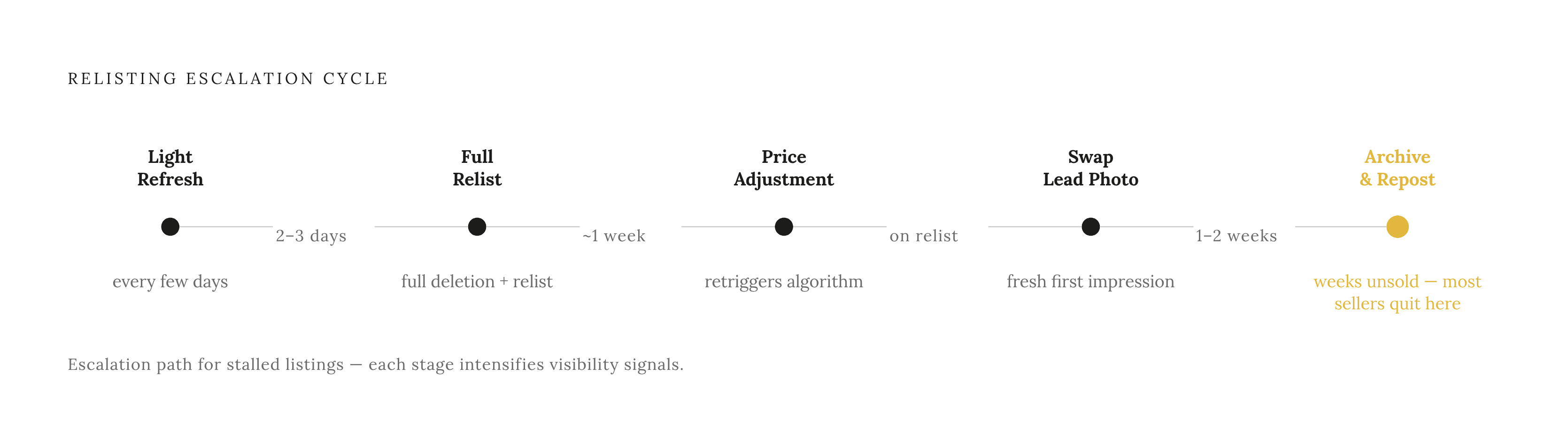
Testing across a large sample of listings points to a workable refresh rhythm: a light refresh every couple of days, a full relist about once a week, a small price adjustment on relist to retrigger algorithm notifications, a swapped first photo after a week or two, and a full archive-and-repost for anything that's been up for several weeks.
Relisting too many items too quickly can get an account flagged, so pace matters. If you relist a large batch of items within a single hour, Facebook's security systems read it as bot-farm behavior, and the account gets flagged for it. The fix is simple: spread relisting across small batches throughout the day instead of blasting through the whole inventory at once.
Meta's Seller app offers a native alternative, with relist functionality built in and a unified inbox that threads buyer conversations under each listing. That matters because manual deletion has a quiet cost: it can sever an active buyer conversation tied to the old listing, while native relisting preserves that context.
Matching tools to the bottleneck that is slowing you down
Every seller has one friction point doing most of the damage, so the fastest fix is matching a tool to that bottleneck instead of bolting every available tool onto the same workflow out of caution.
If photo quality is the holdup, background removal tools like BOARD or PhotoRoom solve it at the source, before any other step happens. If writing the listing is the wall, Meta's Seller app AI or a tool like Reclaim: Sell with AI turns a photo into a title, description, and category in seconds. If pricing is the guesswork, the sold-data workflow, whether that's eBay's sold filters, eBay's Product Research and Terapeak tools, or an automated lookup, replaces a guess with an actual transaction history. If stale inventory is dragging visibility down, Relistify's one-click relist or Meta Seller's native tools handle the refresh cycle without a manual rebuild each time.
Plenty of sellers listing more than a handful of items find all four bottlenecks hitting at once, and that's the case where collapsing steps matters most. Reclaim: Sell with AI fits that situation directly: it identifies the item from a photo, prices it from sold data, and generates the listing in the same pass, compressing four separate chores into one upload. Facebook Marketplace listings that are priced from sold data, photographed cleanly, and kept fresh with a regular relist cycle tend to sell within a few days for items in demand. None of that requires expertise or a free weekend, just the right tool pointed at the right bottleneck.
Scams that target Facebook Marketplace sellers
A listing that goes live faster doesn't help much if the proceeds end up in a scammer's pocket instead of a bank account. Four scam patterns appear repeatedly on Facebook Marketplace and are worth knowing by name before that first "SOLD" tag goes up.
Fake payment confirmation starts with a buyer who agrees to the asking price almost instantly, with zero negotiation, and that speed should be treated as a warning sign. They claim to pay through Zelle or Venmo, send a screenshot of a confirmation that was never real, and then push hard for the item to ship immediately, before the seller has time to check their account.
Overpayment and refund scams run on a stale trick that still works: a buyer sends a check for more than the asking price, claims it was a mistake, and asks for the difference back via Zelle or gift cards. The check bounces days later, and the seller's own money, sent in good faith, is gone along with it.
Verification code theft targets trust directly. A scammer claims they need to confirm the seller is a real person, sends a Google Voice or SMS code, and asks the seller to forward it back. That code isn't verifying anything on the seller's end. Scammers use it to set up fake accounts or commit identity fraud somewhere else, with your phone number as the delivery method.
The pattern across all three scams is the same: urgency, an unverifiable confirmation, and a request to move money or information somewhere it shouldn't go. Recognizing that pattern on sight is the last skill that turns a fast, well-built listing into money that actually lands in the right account.