Product Photos That Sell Used Items Faster
Better photos mean faster sales and fewer returns on secondhand items.

83% of shoppers say photos are "very" or "extremely" influential in whether they buy something, and that figure comes from E-marketer research. That number beats out descriptions and reviews combined. Photos matter for selling used stuff. It's whether you're taking the right ones, in the right order, with the right light. Turns out, there's a formula for that, and none of it requires a camera fancier than the one already in your pocket.
The one photo that does the most work: the hero shot
The hero shot is your thumbnail. That's the image a buyer sees before they click, before they read a word of your description, before they even know what platform they're browsing on half the time. Its only job is to earn the tap. Not to document, not to show off, just to get clicked.
The formula's simple: whole item, centered, sharp focus, clean even light, plain background, frame filled edge to edge by the product. No clutter competing for attention.
An optimization guide from ecommerceplayer.com puts eBay's mobile traffic at over 60%. A photo that looks crisp on a 27-inch monitor can turn into mush on a 6-inch phone screen. So test it there. Pull the photo up on your phone before you publish and squint at it like a stranger would.
eBay's click-to-zoom feature activates only on images 800 pixels or more on the longest side, and super-ds.com's eBay guide recommends at least 1600 pixels on the longest side as your practical floor, not a suggestion. And because that hero shot becomes the thumbnail everywhere you cross-list, one good image does the selling work on every platform at once. No need to reshoot for each site.
Watch for the usual suspects that tank a hero shot: a close-up of a tag instead of the full item, a busy or patterned background, or a photo shot in bad light that reads as muddy on a small screen. None of these require new gear to fix. They require better framing and better light, full stop.
How many photos to take, and in what order
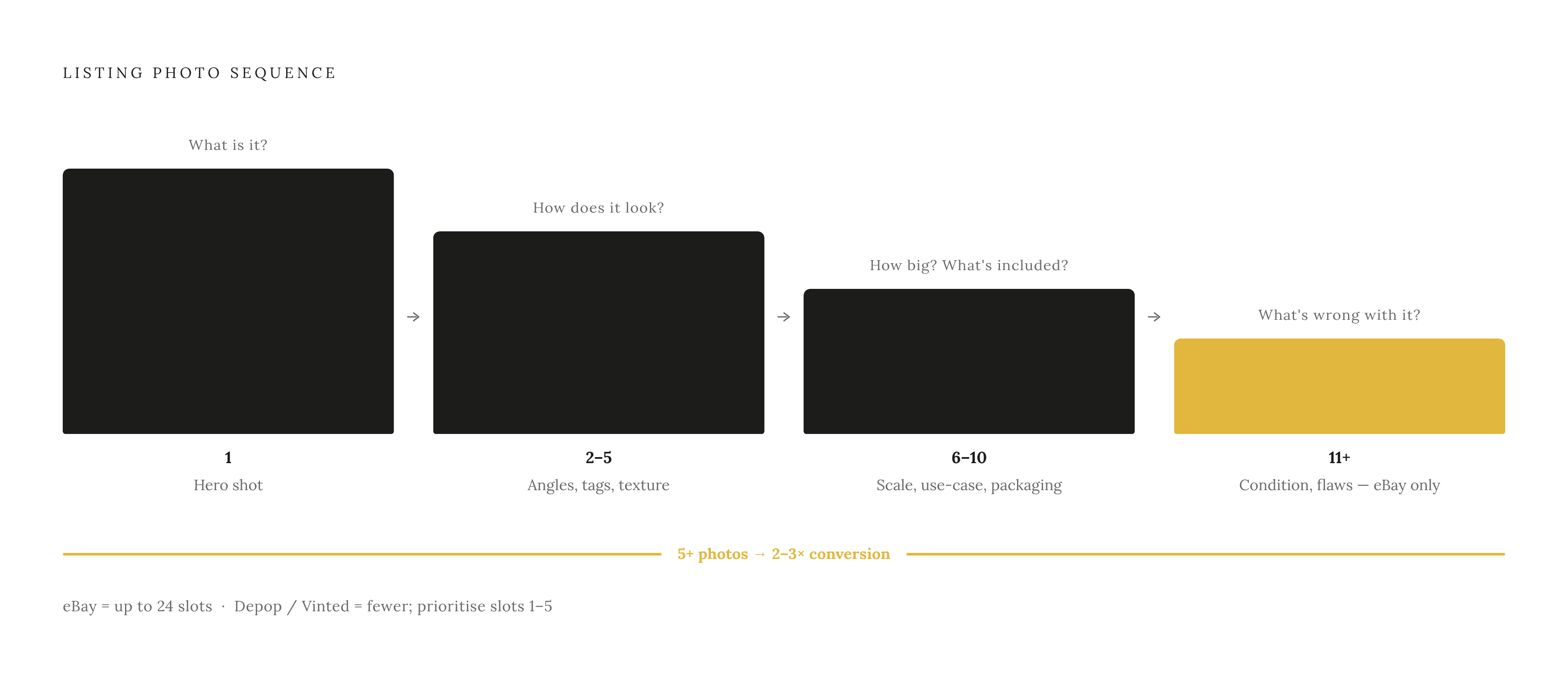
Platforms set the ceiling. eBay gives sellers up to 24 photos per listing for free. Facebook Marketplace caps out at 10. Either way, more isn't just allowed, it's rewarded: listings with five or more high-quality photos convert two to three times better than listings with just one, and insightagent.app's Etsy listing guide finds the underlying logic holds across categories and platforms.
A sequence that actually earns its slots instead of padding the gallery:
- Photo 1: the hero shot, neutral background, best honest light
- Photos 2 through 5: multiple angles, a scale reference, close-ups of tags, hardware, texture, brand marks
- Photos 6 through 10: use-case shots, packaging, size comparisons
- Remaining slots (eBay only): condition documentation, included accessories
Every photo in that list answers a question the last one raised. Photo one says "here's what it is." Photo three says "here's how big it actually is." Photo seven says "here's what's included." Shoot with buyer questions in mind (what is it, how big, what shape is it in, what comes with it) and the sequence writes itself. Shoot randomly and you end up with twelve pictures of the same angle and none of the ones that actually matter.
On the technical side: aim for at least 1600 pixels on the longest side, square format when possible, and keep each file under 1MB so it loads fast on mobile. eBay recommends JPEG quality around 85, and super-ds.com's guide confirms this. Closo's photography guide points to a reseller who improved photo quality across their listings and saw sales climb 40% over three months, with returns dropping at the same time. That's not a fluke, that's what happens when buyers actually know what they're buying before they buy it.
Getting the lighting right without buying equipment
Lighting is the single biggest gap between a photo that looks like a garage sale and one that looks like a catalog, and Getting it right costs nothing beyond attention.
Midday sun is free and it's good, even in winter. SaleHoo's eBay photography guide recommends shooting outside during the day whenever possible. No yard? Window light works just as well indoors, as long as it's daytime and the light is coming in soft, not blasting directly onto the item.
Shooting at night or somewhere with no natural light coming in, you'll need to create your own even illumination. The goal is soft, spread-out light with no hard shadows carving up the product.
One trick that costs actual zero dollars: prop a white foam board or a flattened cardboard box on the side opposite your light source. It bounces light back into the shadows and evens out the exposure, and it's a trick that works on basic physics alone. Nothing fancy, just physics and a spare box.
What kills a photo: direct flash (it flattens texture and warps color), shooting with your light source behind the item so it turns into a silhouette, and yellow-tinted bulbs that shift the color of everything in frame. A quick gut check before you list: pull the hero shot up on your phone, drop the brightness to 50%, and see if the item still reads clearly. If it does, your lighting's fine. If it doesn't, that's not an aesthetic problem, that's the seed of an "item not as described" dispute waiting to happen.
Photographing condition honestly, why flaw shots protect the seller
Photographing the flaws doesn't cost you the sale, even though that sounds backwards until you think it through. It prevents the return, the dispute, and the bad review that follows you around long after the item's gone, as any experienced reseller will tell you.
Buyers who see the scratch before they buy tend to keep the item and leave a good review afterward. Buyers who discover the scratch after the box arrives tend to do neither.
A condition shot covers whatever a buyer would notice if they were holding the item in person: scratches, stains, worn edges, faded print, missing hardware, pilling on a sweater. For used and vintage pieces especially, natural light and a plain background signal honesty. The goal isn't to make the item look brand new; that's the standard any honest listing should meet. The goal is to show it as it actually is.
These shots belong later in the set, roughly photos six through ten, after the buyer's already interested. The hero shot up front should still be the item's best honest angle, not its worst one. For electronics, throw in a shot of the model number or serial label too. It answers authentication questions before anyone has to ask.
And here's the payoff that matters most for your wallet: honest condition photos let you price with confidence. A seller who shows the scratch and prices around it gives buyers the evidence they need to accept that price. Buyers tend to assume the damage they can't see is worse than the damage they can.
Category-specific shooting adjustments: clothing, electronics, and small collectibles
Not every category shoots the same way. A few adjustments by type:
Marszalstudio.pl's Vinted guide finds that on-body photos sell clothing two to three times faster than flat lays, because buyers want to see how a garment actually hangs on a body, not how it lies on a bed. No need to show your face either. A neck-down shot does the job and removes the one hesitation that keeps a lot of sellers from shooting on-body at all. Cover front, back, the label (brand and size), fabric texture, and any zippers or buttons, plus every flaw. Flat lays are fine for a basic tee or jeans, but a mannequin or a body works much better for anything fitted, like a blazer or a dress. And steam or iron before you shoot. Wrinkles read as "used and abused" even on a garment that's in perfect shape.
Electronics: buyers want two kinds of proof here: it looks fine, and it works. Photograph the screen powered on, show the ports and connectors, and lay out any included accessories or cables. Include the model number in at least one shot so nobody has to ask. Screens are tricky under light, tilt the device to dodge glare while keeping the display visible. Uprightlabs.com's trends report shows brands like Apple and Sony had strong secondary-market activity in 2025 resale data, and photos that include specs support pricing that actually reflects that brand premium instead of undercutting it.
Small collectibles, toys, trading cards: a cheap lightbox goes a long way here, spreading light evenly and killing the shadows that show up on shiny or textured surfaces. Get shots of serial numbers, holograms, manufacturer marks, and original packaging if you've still got it. Toss a coin or a ruler into one frame for scale, it saves the buyer from having to read dimensions off a spec sheet and trust you got the measuring tape straight. eBay's 24-photo cap is a genuine advantage for this category since collectibles often need that extra documentation depth to sell with confidence.
What AI editing tools can and cannot do for used-item photos
AI editing has a real job in this process, and it's a narrower one than people assume. Marszalstudio.pl's guide explains that background removal tools like Photoroom or Remove.bg, and AI-assisted brightness and color correction in apps like Lightroom or Snapseed, clean up a photo without touching what's actually in it. That's editing, not fabrication.
That background cleanup should simplify the scene, never hide damage or change how the item looks. A photo that misrepresents the product generates a return, and that return costs more than whatever the sale was worth.
Buyers are getting sharper at spotting manipulated images too. Inconsistent texture, shadows that don't match the light source, edges that blur out where they shouldn't, these are the tells buyers are increasingly trained to look for now. The safest approach keeps the focus on accurate representation. The safest move is keeping colors true to life, skipping heavy filters, and never generating a fake backdrop that misrepresents the item's real condition.
Bottom line: AI editing saves time on background cleanup and exposure fixes. It doesn't replace the actual work of photographing the real item in its real condition. It's a tool for the editing step, not a shortcut around the shooting step.
How good photos connect directly to faster pricing decisions
Price off sold listings, never asking prices. Asking prices are wishes. eBay's "Sold Items" filter shows what identical stuff actually changed hands for, which is the only number that matters.
Photos and pricing aren't separate steps, they're linked. A listing with thorough condition shots can sit at the higher end of the sold-comp range because the buyer's got evidence in front of them to justify that price. A listing with two blurry photos and a prayer invites skepticism, and that skepticism appears in the form of lowball offers.
A Facebook Marketplace guide from baltimorechronicle.com puts used household items at 30% to 70% below current retail depending on condition and brand. Good photos are what let a seller land at the top of that range instead of defaulting to the bottom out of fear nobody will believe the item's actually in good shape.
Facebook Marketplace doesn't show sold prices the way eBay does, so a practical approach is checking eBay's sold comps first, then pricing slightly above your real bottom line to leave room for the back-and-forth buyers expect on that platform. Some AI tools, including the one built into Reclaim, can pull real eBay sold-data pricing straight from a single photo, so the same image doing the selling also anchors the price to what buyers actually paid, not a guess.
A seller who shoots the item right, documents the flaws honestly, and checks sold comps has done the whole job. The photos aren't decoration at that point. They're the evidence the price is built on.
Building a repeatable photo routine that removes the friction of listing
Most stuff doesn't go unsold because the seller lacks motivation. It goes unsold because taking the photos feels like a chore with no clear starting point, and "I'll do it later" quietly becomes "never." A fixed routine kills that friction before it has a chance to build up.
The setup barely counts as a setup:
- One shooting spot with steady light, a window or a couple of lamps aimed at a plain surface
- A sheet of white poster board or foam board as a background, a few dollars at most
- A second foam board propped up as a reflector
- The phone that's already in your pocket
Batch it. Shoot five or six items in one sitting instead of setting up and tearing down each time. The setup cost is fixed either way, so the more items you run through it, the cheaper each one gets in time and effort.
A quick checklist to run through per item: clean it up first, shoot the hero shot on a neutral background in good light with the frame filled, grab four to six angle shots including a scale reference, get the detail shots (labels, hardware, texture), photograph every flaw clearly, then pull up the hero shot on your phone one last time before you hit publish.
AI listing tools that can pull real eBay sold-data pricing straight from a photo (Reclaim does this, among others) shrink whatever friction is left once the photos exist. At that point, the photo session basically is the whole work session.
None of this changes whether it's someone's first item or their five-hundredth. No expertise required, just the same steps run the same way every time. And that consistency adds up. Better photos today build the seller reputation that makes tomorrow's listings sell even faster.