Getting Started Selling on Facebook Marketplace
Selling on Facebook Marketplace comes down to four things: a working account, a real price, decent photos, and a listing that answers questions before anyone has to ask them. None of it takes experience. My neighbor proved as much when she sold a treadmill in forty minutes last month, still not knowing what a "category tag" is.
Marketplace lives inside an app almost everyone already has open, so there's no download, no new password to forget, no learning curve. It's the same account you use to check on your college roommate's dog. It's also become the default spot for furniture, kids' gear, and household electronics, and if you're doing local pickup, nobody's taking a cut of your sale. Used goods are having a moment too, what with retail prices doing whatever they're doing lately, so buyers show up already willing to shop secondhand. The gap that trips people up is usually the one between "I should sell that" and actually opening the app.
What you need before you create your first listing
Use an account you've had for a while, since brand new Facebook profiles sometimes sit in a queue for days before Marketplace access opens up. There's no reason to eat that wait if you've had a profile since 2014 collecting dust and old birthday reminders. A real photo and some account history also buys you trust before a buyer's read a single word of your listing.
Your phone's camera is fine for this, since lighting does more work than lens quality ever will, so don't go spending money solving a problem you don't actually have.
Take your photos before you open the listing form, not during. Do it the other way and you're toggling back and forth, losing your place, re-uploading because you forgot to shoot the back of the couch. Shoot everything first, then sit down and build the listing in one pass, like an assembly line, except the product is your old futon.
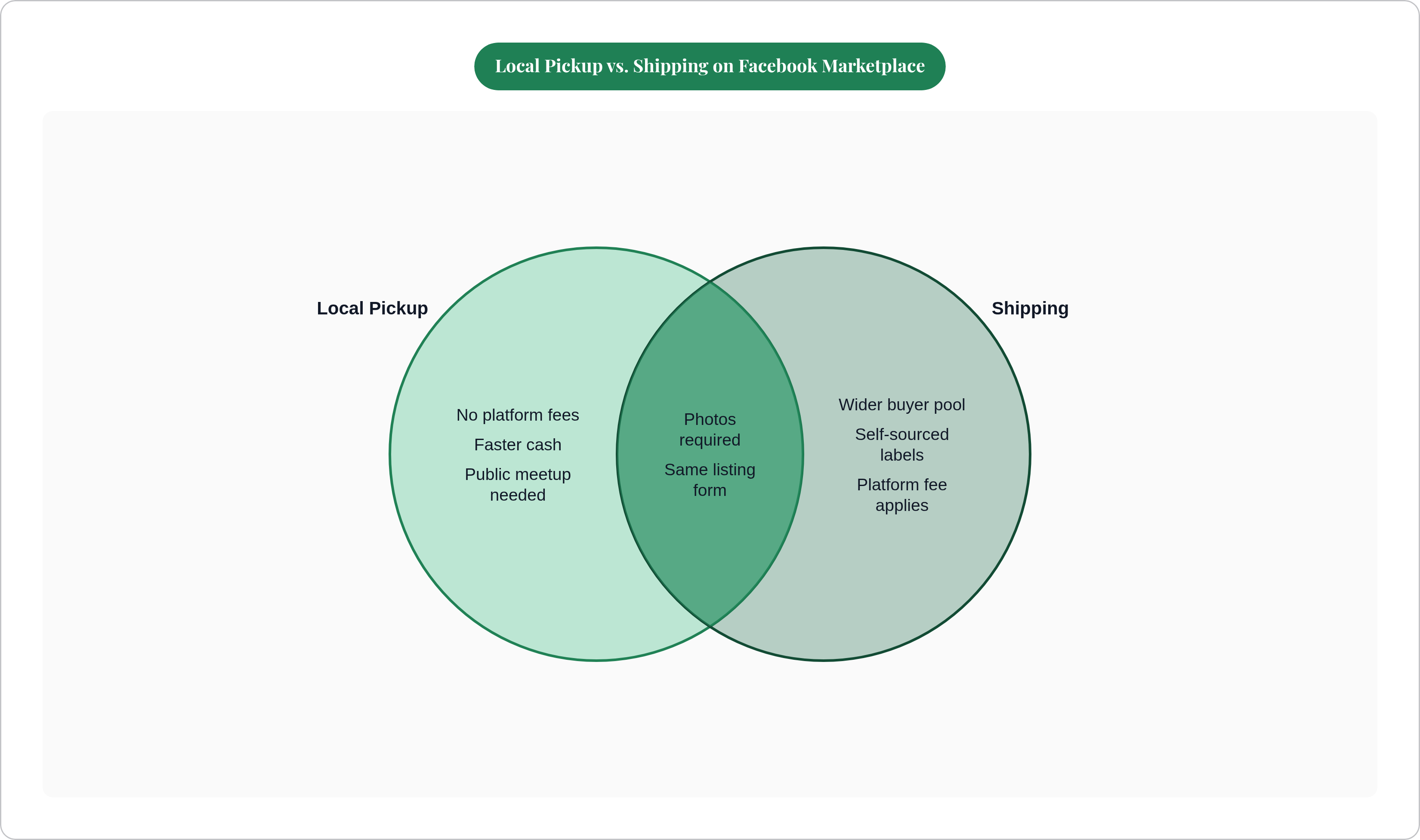
Have a rough number in mind going in, just enough to anchor the pricing research in the next section. Pick local pickup or shipping before you do anything else. Local pickup means no fees and faster cash, which makes it the right default for a first listing. Shipping opens the buyer pool but adds boxing, labels, and a platform fee. Worth flagging: Facebook pulled prepaid shipping labels for most sellers in early 2025, so if you're shipping, you're sourcing labels yourself through a carrier or a third-party service.
How to find a price that will actually sell the item
Asking prices from other sellers are just wishes with dollar signs attached. The only number that matters is what similar items actually sold for, and that number lives in exactly two free places.
On eBay, filter to "Sold items," which shows real completed sales, not listings that have been limping along for four months hoping someone bites. On Marketplace, scroll similar listings and watch for ones marked sold or pending, then note how long they sat. Something that sold in a day is telling you its price was right, while something that sat for six weeks is telling you the opposite. Cross-reference the two and you've got a band to work in, not some magic single number.
Rule of thumb: most used items sell comfortably under half of original retail, and condition drives the swing more than anything. Still in the box pushes toward retail, while scratched, stained, or missing a piece drags it well under the midpoint, and no amount of flattering lighting fixes that math.
Prices are local too, which people forget constantly. A dresser that moves in three days in Chicago might sit for a month in a smaller market at the exact same price. Check what's actually selling near you, since national averages have never heard of your zip code.
Leave room to negotiate. Marketplace buyers treat your listed price as an opening bid whether you meant it that way or not, so price a bit above your real floor. That way, when someone counters right at your minimum, you say yes and you haven't lost a dime. Price at your bottom dollar and you've got nowhere to go but down, or nowhere to go at all, which is a worse spot to negotiate from than it sounds.
Small trick, works surprisingly often: price just under a round number. Someone filtering by price range will catch $95 and miss $100 completely, which means that's a buyer gone over one dollar.
Taking photos that make buyers stop scrolling
The thumbnail is your headline, and if it doesn't stop someone mid-scroll, nobody's reading your title, and nobody's noticing your very reasonable price. It's dead on arrival, with no second chance.
Lighting solves more problems than anything else on this list. Natural light near a window, or outdoors on an overcast day, costs nothing and improves almost everything it touches. Skip the flash, since it flattens the item, throws glare everywhere, and makes the whole listing look like it was shot in a rush, because, let's be honest, it was.
Background matters more than people give it credit for. A plain wall or clean floor does the job just fine, but a background full of laundry and loose cords tells the buyer they're buying into somebody's chaos. Clutter reads as low value even when the item itself is in perfect shape.
Cover the angles that answer real questions before they get typed into your inbox: a clean front shot for the thumbnail, then sides and back so nobody's guessing. Get close on any scuff or flaw, since it feels backwards, like you're talking yourself out of the sale, but it builds trust fast and heads off the "this wasn't as described" message nobody wants to deal with. For electronics, shoot the model number and any markings, since buyers search by exact model, not vibes. Got the charger, the remote, the original box? Photograph those too, since complete kits justify a better price, and buyers notice.
Marketplace gives you up to ten photo slots. Use most of them, since two blurry photos reads like an afterthought, while eight clear ones reads like someone who actually knows their stuff. Same couch, same condition, completely different outcome, just from how it's shown.
Filling out the listing form step by step
From the Facebook Feed, tap Marketplace in the left menu, hit "Create new listing," choose "Item for sale," upload the photos you already took, and start filling in fields.
Title carries the heavy lifting here, since it decides whether your item shows up in search at all. Write what a buyer would actually type, since nobody searches "beloved family heirloom sofa" when they search "blue linen sofa." A simple formula covers most cases: condition, color or material, item type, one key detail. Something like "like new blue linen sofa with chaise." Keep it tight, since long titles just get chopped off in search results anyway.
Price goes in exactly as worked out earlier, buffer included, no second-guessing. Category should be the most specific option available, since Marketplace search leans hard on that field to decide who even sees the post. Condition should be honest: new, used like new, used good, used fair. Round up here and you'll get a complaint and a bad rating down the line, and that's a trade nobody should make for one extra sale.
Description is where you head off every message you'd otherwise get anyway. Dimensions matter for furniture, because nobody wants to buy a dresser only to find it doesn't clear the doorway. Brand and model number matter for electronics, plus what's included and what isn't. State any flaw plainly instead of burying it in paragraph four like it's a legal disclaimer. Pickup logistics, whether you can help carry it, how you want to get paid, all belong here. Close with one clean line: "Message me to arrange pickup."
Keep the location accurate, since Marketplace uses it to decide which nearby buyers even see the post. Fill in every structured field Facebook gives you, brand, size, color, whatever applies. That data feeds search, and a half-filled listing quietly sinks below a full one. Giving something away? Set the price to zero and the rest of the process stays exactly the same.
What happens after you hit publish
If the price and photos are right, expect messages within hours, not days, so reply fast. Buyers move on quickly, and the next listing they open might be worse than yours but faster to answer.
Low offers are just part of the deal, so don't take it to heart when someone offers sixty bucks on your eighty-dollar lamp. If the offer's below your floor, counter once at your actual minimum, since most reasonable buyers meet you there. If someone offers full price, lock down pickup right away, before they get distracted by the next shiny listing in their feed.
For pickup, meet somewhere public for smaller items: a parking lot, a coffee shop, anywhere with other people around. For bigger stuff requiring a home pickup, have someone else there and confirm the details by message beforehand. Take cash or a payment app, and confirm the money actually landed before anything changes hands.
Silence for a day or two? Refresh the listing itself, since older posts sink in search and reposting resets that clock. Check whether the price still matches recent sales, since the market shifts even within a week. Maybe swap the thumbnail too, since sometimes one photo is the entire reason nobody clicked.
Once it sells, mark it sold immediately, which keeps your history clean and makes your next listing look more credible to the next buyer scrolling past.
Tools that reduce the work of getting a listing live
Everything above works, but it takes real time, and that time is exactly why so many people photograph an item and then never actually list it. The photo sits in the camera roll for three months, right next to forty screenshots nobody will ever open again.
A tool called Reclaim automates a chunk of this: snap the photo, and it identifies the item, reads the condition, writes the listing, and prices it against real sold data. Handy if you've got a garage full of things to move and no interest in redoing the research five separate times. Facebook has also been rolling AI-assisted listing tools into its own Marketplace flow, generating titles and descriptions straight from a photo, though how much of that you get depends on your account and region.
For pricing research on its own, eBay's sold-items filter is still the most reliable free option out there, regardless of where you end up posting. And if you're shipping, check third-party label services before you walk up to the post office counter, since they often beat retail carrier rates by a real margin, not a rounding-error one.
Momentum beats polish here, plain and simple, since a listing that's 85% right and actually posted will outsell a perfect one still sitting in your camera roll.