The Fastest Pricing and Publishing Workflow for Facebook Marketplace Sellers
Use eBay sold prices and reusable templates to sell faster.

The fastest way to price and publish items on Facebook Marketplace is to use sold-price data, adjust for condition, and build each listing from the same photo and text templates. A repeatable system beats hustle because it removes the two biggest delays, namely guessing the price and starting every post from scratch. Here is that workflow, from the first photo to a safe handoff.
Why Facebook Marketplace rewards a system, not effort
Treating Marketplace like a digital yard sale tends to produce matching results, right down to the endless haggling. Local pickup has no seller fees: no listing fee, selling fee, or payment-processing fee. Keeping the full sale price is a strong advantage, but only if the item sells without becoming a second job.
Marketplace sorts listings by relevance, freshness, engagement, seller responsiveness, price competitiveness, and listing quality. An optimized, maintained listing can therefore outrank a careless post for an identical item at the same price. The practical task is to remove two bottlenecks in order, first bad pricing inputs and then slow publishing.
Why active listing prices are the wrong data source for setting your price
An active listing tells you what a seller wants. Facebook Marketplace does not show sold-price history the way eBay does, so nearby listings show you what sellers ask and leave you without the prices buyers paid. Those prices can look right just because several sellers hope to get the same amount. A crowd of optimistic sellers is still not a sale.
Think of a dresser with active listings priced above the range that similar dressers sold for. Matching those asking prices puts your dresser among the unsold ones and above the prices in the completed deals. Condition can widen that mistake because the median sold price for “good condition” differs from the median for “like new.” Recent sold prices for comparable items are the useful anchor. Sellers who rely on active prices instead chronically overprice, and their listings stall.
Using eBay's sold-listings filter as the fastest reliable pricing source
Start by searching eBay for the item, using its brand and exact model where available. Apply the “Sold Items” filter to move from asking prices to completed sales. Read the prices for items that match yours in model and condition to find a useful resale range for the thing actually in front of you.
Before recording a price, check for the “best offer accepted” marker. That item sold below the displayed price, so the figure on screen is not the amount that changed hands. Write down the range for similar items that sold, keeping in mind that those marked figures are above what buyers paid. Terapeak, free inside eBay Seller Hub, extends the window back as far as three years when seasonal items or thin results make a 90-day window less useful.
Next, use sell-through rate, or STR, to get a quick sense of demand. When about as many units have sold as are still active, demand looks healthy, but when far more are active than have sold, there is a lot of supply and a reason to price near the bottom of the sold range. Reclaim: Sell with AI identifies an item from a photo and automatically pulls real sold-price data for sellers who want to skip the manual search. That gives a first-time seller access to the same kind of pricing intelligence a seasoned reseller looks up by hand.
Translating a sold-price range into a specific number for your item
Turn the range into a listing price by starting with the median sold price, accounting for condition, and adding room to negotiate. Keep the condition of the comparison items in view so you do not treat a barely used example as equivalent to a worn one. The notes on condition provide qualitative guidance for price adjustments.
Like new means barely used with original packaging and belongs at the high end of the resale range relative to retail price. Excellent condition means no visible wear and calls for a moderate discount from retail. Good condition means minor wear but full function and calls for a meaningful discount. Fair condition means noticeable wear or some defects and calls for a steep discount. Use those distinctions to adjust the median where the sold examples are in better shape than your item.
Then set a minimum acceptable price and list above it. A negotiation buffer gives the buyer room to feel they won while you still get your target price. Hold at the target price in Week 1–2, reduce moderately in Week 3–4 if there are no inquiries, and evaluate a further reduction or a hold in Week 5–8. Marketplace has a faster warning signal, however, because many views but no messages after 5–7 days call for a reduction and renewal. The resulting number goes directly into the listing once the channel is chosen.
How category affects where to price and which marketplace to use
Bulky, local-preferred, and cash-preferred items fit Marketplace, while shippable niche items, collectibles, and electronics often fit eBay better. Baby gear and kids’ toys move quickly locally because parents prefer pickup and want to see the items before buying. A dresser and a vintage receiver should not automatically get the same route just because both are occupying the spare room.
Electronics tend to sell for more on eBay because it has buyers across the country and lets them search for the exact model. Vintage receivers, turntables, and speakers from Pioneer, Marantz, Sansui, and Kenwood have specialist demand through eBay’s category filters, while local buyers are sparse. That makes category a pricing input as well as a publishing decision. Compare what the item is likely to sell for through each channel, even if one posting screen is more familiar.
Fees belong in that comparison, but they do not settle it alone. Marketplace local pickup has no seller fee, while shipped Marketplace orders carry a fee, so verify current rates in Facebook Help before relying on shipped margins. eBay costs more in fees but can produce a higher gross price for shippable niche items. The fee winner is not always the profit winner. For serious sellers, running both channels lets each item go where its buyers are.
Building a Marketplace listing that the algorithm surfaces and buyers click
With the price set and the channel chosen, assemble the listing from a template. Start with photos in natural light, staging the item in context where possible so buyers can picture it in their space. The first photo should show the full item straight-on against a clean background. Photos 2–4 should add angles that show depth and scale, and photos 5–7 should show features, brand labels, and quality details. Use photos 8–10 for wear or imperfections, because a surprise scratch is a poor closing gift.
Build the title in the order Brand + Product Type + Style/Feature + Condition + Size/Specs. Keep it short enough to avoid being cut off in buyer feeds, use title case rather than ALL CAPS, and include the model number and words buyers would search. Set the most specific accurate subcategory to support relevance.
The description should answer the questions that otherwise arrive one message at a time. Include dimensions, color, material, condition, flaws, age, brand or model, and the original retail price as a value anchor. Add pickup logistics and accepted payment methods, with clear terms such as “no holds” or “first come, first served.” Good photos and full details help with listing quality and engagement, while quick replies help with seller responsiveness.
For multiple items, the useful shortcut is to automate assembly without changing the underlying workflow. A seller can use the manual templates or have the title, description, and condition grade generated from photos through Reclaim: Sell with AI. Skipping that writing step makes it faster to post each item and adds to the value of Marketplace’s zero-fee local sales.
Keeping listings visible after they go live
Visibility decays within days, so publication is the start of maintenance. Edit or relist every 2–3 days to refresh the recency signal. A small wording change or a price adjustment of a dollar or two can refresh the listing without creating a duplicate. Fully relist periodically to restore visibility, and respond to inquiries within one hour. Freshness earns attention, but an unanswered buyer cannot complete the sale.
Cross-post to active local Facebook buy-and-sell groups to reach people who browse outside the main Marketplace feed. Search using “buy sell [your city]” or “[product type] buy sell” to find relevant groups. Then put the pricing schedule into practice rather than refreshing an overpriced post indefinitely. Many views without messages are the signal to reduce and renew.
Scam patterns that break the workflow and how to close transactions safely
A payment screenshot is not proof of payment. Check that the money has cleared in your own app balance or bank account before you hand over or ship the item. Screenshots can be faked, and if you ship before payment clears, your power to get the buyer to pay leaves with the parcel. The urgency to finish a sale is exactly why this check belongs in the workflow.
Off-platform pressure is another warning sign. A buyer pushing the conversation to WhatsApp, email, or text is moving it somewhere Facebook cannot see or investigate. Screen the profile as well, treating a brand-new account with no history, mutual connections, or reviews as a meaningful risk signal.
Use Meta Pay or PayPal Goods and Services, and verify receipt in your own account. Never accept checks for Marketplace items. If you have already accepted one, wait at least two weeks for it to fully clear before treating the funds as real. Never refund an overpayment through a different payment method from the original.
Use a designated safe exchange zone for in-person handoffs once the sale is worth more than a small amount. Many police departments have these areas in their parking lots, with cameras watching them 24-hour. When shipping items worth a lot of money, require tracking and delivery confirmation. Particularly valuable items also call for signature confirmation. A fast workflow is useful only if the sale ends with both payment and item accounted for.
The complete end-to-end workflow in sequence
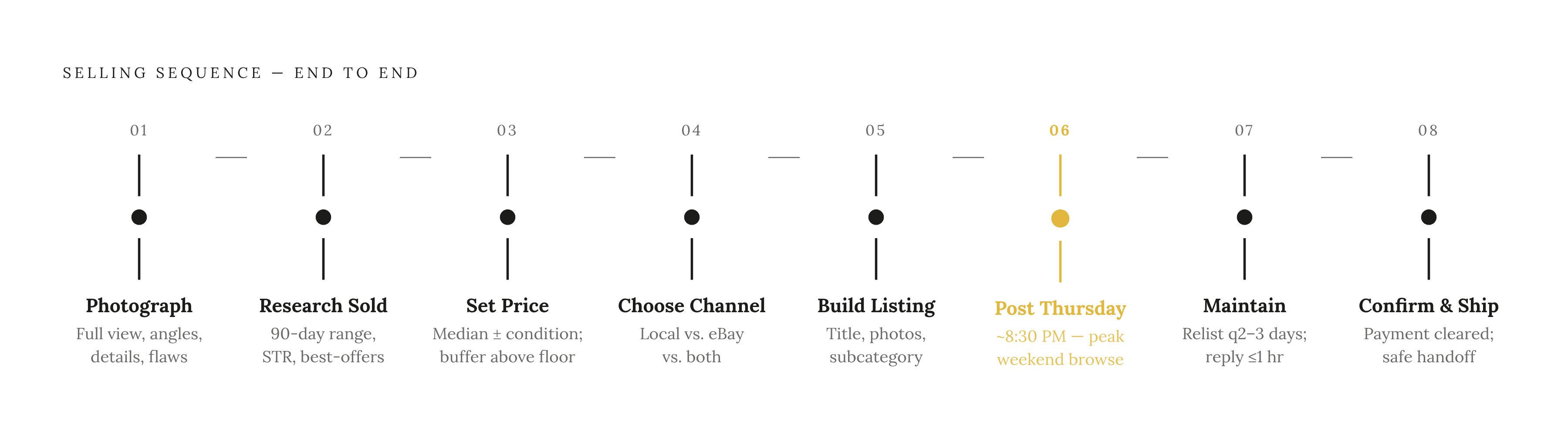
First, photograph the item in natural light, beginning with the full view and continuing through angles, details, and flaws. Second, search eBay’s “Sold Items” results, record the 90-day sold-price range, check best-offer markers, and assess demand through STR. Third, adjust the median for condition and add a negotiation buffer above your minimum acceptable price.
Fourth, sell bulky or local-preferred items on Marketplace and shippable niche items or collectibles on eBay, using both channels when it helps. Fifth, assemble the title, description, photos, and most specific subcategory using the publishing template. Sixth, post Thursday around 8:30 PM so the listing is fresh when weekend browsing is at its peak. Seventh, maintain visibility through regular edits or relisting, reply within one hour, and act on the repricing signal. Eighth, confirm payment in your own account and complete the handoff or shipment with the safety measures above.
The shortcut version uses Reclaim: Sell with AI to compress the research, condition assessment, pricing, and listing-writing work into a photo upload. It identifies the item, pulls sold-market data, grades condition, and writes the listing, automating those tasks so sellers can move from photo to live post in seconds. Whether the work is manual or assisted, the order stays the same. Price from evidence, publish from a template, maintain the offer, and close safely.